Quick Answer
Practical digital signage ideas for fitness studios, Part 3 of 5
Every fitness studio has something competitors cannot copy: its people.
Members often choose a studio because they trust the trainers, enjoy their coaching style, or feel welcome around the team.
A Trainer Spotlight screen introduces those people clearly, helping members recognise trainers, understand their specialties and discover who might be right for them.
What is a Trainer Spotlight screen?
It is a digital signage slide, usually one of several in a rotating playlist, that introduces one of your coaches on screen.
Instead of showing a long biography, it focuses on the information members actually care about.
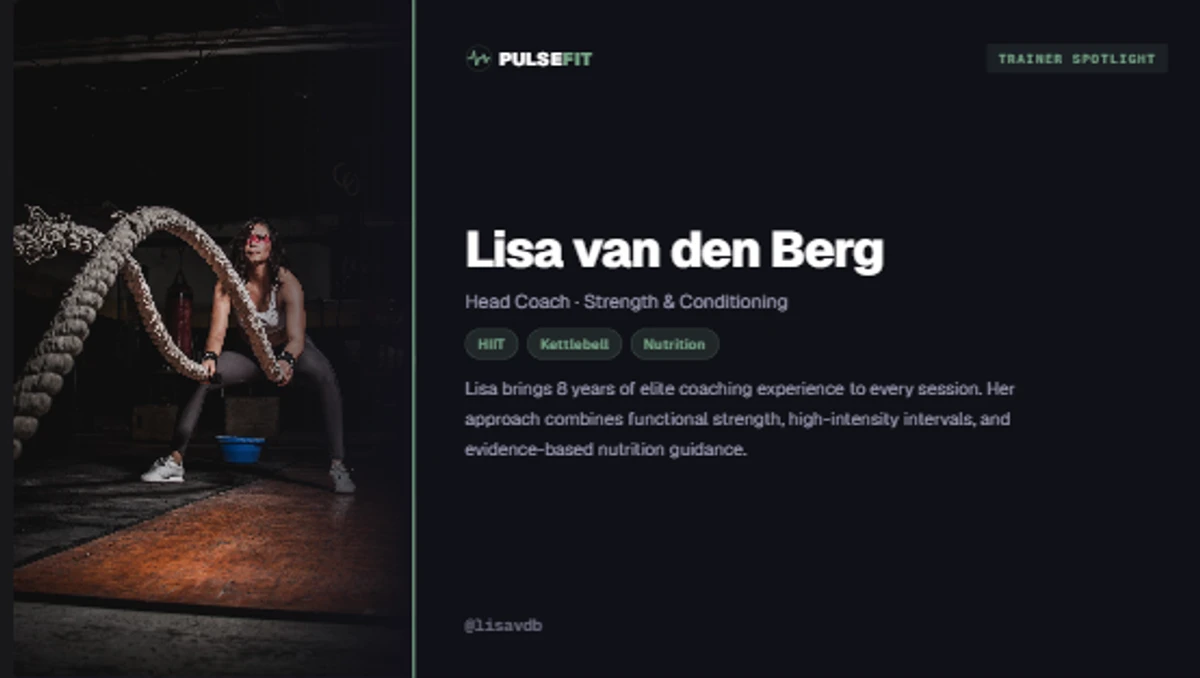
The Trainer Spotlight template in Framebaker. Upload a photo, add profile details, and publish to your screens.
Keep the introduction short enough to read in a few seconds. A Trainer Spotlight screen should introduce the trainer, not reproduce their full website profile.
A typical Trainer Spotlight includes:
- Name
- Photo
- Role or speciality
- Short introduction
- Favourite class
- Coaching philosophy
- Certifications
- QR code to book a session (optional)
Think of it as a digital profile that rotates alongside your other content.
Help members get to know your team
A new member may recognise a trainer before attending their first class.
An existing member may discover someone who specialises in strength training, mobility, rehabilitation or nutrition.
The screen does not replace a real introduction. It simply makes your team more visible and gives members a reason to start a conversation.
What content do you need?
For each trainer you will typically need:
- A clear trainer photo
- Name and role
- Main specialty
- One short personal introduction
- Optional certification or qualification
- Optional booking link or QR code
Examples of short introductions that work well on screen:
- “Loves helping beginners build confidence.”
- “Strength coach with a passion for Olympic lifting.”
- “Ask me about mobility and injury prevention.”
The template handles the layout. You provide the details.
Where should the screen appear?
Trainer Spotlights work well in places where members naturally have a few moments to look around.
Reception
Ideal placement. Members and visitors have time to read on arrival.
Lounge or waiting area
Good option. Natural dwell time before and after sessions.
Personal training area
Useful context for members considering a personal trainer.
Because the content rotates automatically, every trainer gets equal visibility throughout the day.
Reception and waiting areas work best for longer profiles because members have more time to read. On a busy training floor, use a shorter version with only the trainer’s name, specialty and one clear message.
How the template works in Framebaker
The Trainer Spotlight template is available in the Framebaker template library for fitness studios.
To set up a trainer profile:
Upload a trainer photo
Add a portrait photo for each trainer. The template positions it automatically.
Add their profile details
Enter their name, speciality, introduction and any optional certifications or booking link.
Publish to your screens
Add the slide to a playlist and publish. Update any trainer’s details any time from the CMS.
Need to update a trainer or add someone new? Change it once in Framebaker and every connected screen updates automatically.
Prefer a different style? Use the template as a starting point, or let us help create a version that matches your studio brand.
Combine it with your other fitness templates
Trainer Spotlights work well between useful and promotional content:
- Class Schedule
- Trainer Spotlight
- Membership Promotion
- Events and announcements
This gives your team regular visibility without making the screen feel repetitive.
Put your team where everyone can see them
Your trainers are one of your studio’s biggest strengths.
A Trainer Spotlight screen gives them more visibility and helps members become familiar with the people behind your studio.
It is a simple way to add personality to your screens while making your team easier to recognise.
Explore fitness templates to see the Trainer Spotlight template and the rest of the Framebaker fitness solution.
See Framebaker in your browser
No installation. No sales call. Start managing screens in minutes.
Frequently Asked Questions
How many trainers should I display?
Rotate through all of your trainers automatically so everyone gets equal visibility.
How often should I update Trainer Spotlights?
Whenever your team changes, certifications are added, or you want to refresh profile photos.
Can I use different designs?
Yes. The included template is ready to use, but it can also be customised to match your studio branding.
Can Trainer Spotlights include booking links?
Yes. Add a QR code that links directly to your booking system or trainer profile.
Do Trainer Spotlights work on multiple screens?
Yes. Publish them to one screen, selected locations or every display in your studio.
Related Articles
Framebaker for fitness
Put your trainers on screen
Start with the Trainer Spotlight template and adapt it to your studio.